Samsung Galaxy S24
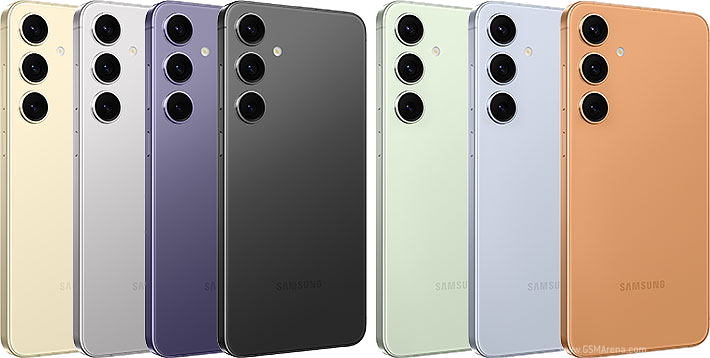
Overview
The Samsung Galaxy S24 is a compact flagship 5G smartphone featuring a 6.2" Dynamic AMOLED 2X display with adaptive 1–120 Hz refresh rate, a triple rear camera system with ProVisual Engine and Galaxy AI, and the Qualcomm Snapdragon 8 Gen 3 for Galaxy processor. It introduces a new armored aluminum frame, Gorilla Glass Victus 2, real-time AI translation, and seven years of OS and security updates.
Specifications
| Feature | Details |
|---|---|
| Display | 6.2" Dynamic AMOLED 2X, FHD+ (2340×1080, ~416 ppi), 1–120 Hz adaptive (Vision Booster 2,600 nit peak), Gorilla Glass Victus 2 |
| Processor | Qualcomm Snapdragon 8 Gen 3 for Galaxy (4 nm), octa-core; Adreno 750 GPU |
| RAM | 8 GB |
| Storage | 128 GB or 256 GB UFS 4.0 internal; no microSD slot |
| Battery | 4,000 mAh non-removable; 25W wired fast charging; 15W wireless; 4.5W reverse wireless |
| Android / One UI | Android 15, One UI 7 (current; launched Android 14 — 7 OS upgrades promised) |
| Rear Cameras | 50 MP f/1.8 wide (OIS, PDAF) + 12 MP f/2.2 ultrawide (120°) + 10 MP f/2.4 telephoto 3× OIS; 8K@30fps, 4K@60fps; ProVisual Engine, Galaxy AI |
| Front Camera | 12 MP f/2.2; 4K@60fps |
| 5G | Yes (sub-6 + mmWave on SM-S921U) |
| Carrier Compatibility | AT&T, T-Mobile, Verizon; eSIM supported |
| Durability | IP68 (1.5 m / 30 min); Gorilla Glass Victus 2 front & back, Armor Aluminum 2 frame; 147.0×70.6×7.6 mm, 167 g |
| Connectivity | Wi-Fi 6E (802.11ax); Bluetooth 5.3; NFC; USB-C 3.2 Gen 1; no 3.5 mm jack; UWB |
Additional Features
- In-display fingerprint sensor (ultrasonic, 3rd gen)
- Galaxy AI — Live Translate, Circle to Search, Chat Assist, Generative Edit
- Seven years of OS upgrades and security patches
- Samsung DeX support
- UWB (Ultra Wideband)
- Real-time Live Translation during phone calls
Lockdown Options
This smartphone supports SecureLock software-based lockdown managed by Yoder Connections. SecureLock restricts access to only approved apps, providing a controlled work environment while still allowing full access to calls, texts, and business apps.
No Lockdown
Phone ships in standard configuration. All apps and features accessible.
SecureLock Options
Choose one of the following SecureLock configurations:
| Configuration | Description |
|---|---|
| SecureLock | App whitelist lockdown → only approved apps are accessible |
| SecureLock + Internet Filtering | SecureLock plus web content filtering |
| SecureLock + Whitelist | SecureLock with a strict website whitelist |
Each SecureLock configuration is available as a new license or transfer license (to move an existing SecureLock license from another device — provide the existing license number at time of order).
Apps to Include with SecureLock
When ordering with SecureLock, select the apps to install (in addition to calls & texts):
- ◆ Maps
- ◆ Weather
- ◆ For additional apps, $10 per app