
Wonder Phone
A Kosher Phone You Can Count On
The Wonder Phone was built with one thing in mind: simplicity without compromise. It’s designed for people who want to stay connected — without being pulled into the noise of modern smartphones. No complicated setup. No distracting apps. Just a phone that works when you need it to — and stays out of the way when you don’t.
With a strong frame, responsive screen, and simple menu, this is a device that fits your life — not the other way around. And with features like Waze GPS, Bluetooth, and Android Auto support, it’s the perfect balance of classic and modern.
Two Models: Wonder & Wonder Pro
The Wonder Phone comes in two models: the standard Wonder and the Wonder Pro. The Pro does not replace the standard — it is sold alongside it as an additional option.
The two models are identical in every way except the camera: same durable flip design, same apps, and all the same configurations (such as Talk & Text and Talk & Media). The Pro simply has an upgraded, higher-quality camera. See the Camera section for details.
Summary of Features
- Durable & Long-Lasting — soft matte finish, non-slip grip
- Waze Navigation
- Android Auto Compatible
- Zmanim app — Jewish prayer times, auto-updated by location
- Yiddish & English keyboard with instant language switching
- Speech to Text & Voice Recorder
- Weather
- Essential Utilities: Calculator, Alarm Clock, File Manager, Notes
- Camera & Gallery — photos; video recording available on request
- Music Player (Talk & Text + Waze and Talk & Media models)
- Bluetooth, Wi-Fi 5
- NO Email, NO App Store, NO internet browser, NO hotspot
Configurations — Apps Included
Both the Wonder and the Wonder Pro come in all of the configurations below. The configuration is chosen at time of purchase; apps cannot be added or removed afterward except as detailed in the Parental Controls section below.
| App | Talk & Text + Waze | Talk & Media + Waze |
|---|---|---|
| Talk | ✓ | ✓ |
| Text (MMS/SMS) | ✓ | × |
| Contacts | ✓ | ✓ |
| Notes | ✓ | ✓ |
| Camera (video on request) | ✓ | ✓ |
| Gallery (plays only videos recorded on the phone) | ✓ | ✓ |
| Music Player | ✓ | ✓ |
| File Manager | ✓ | ✓ |
| Waze Navigation | ✓ | ✓ |
| Calculator | ✓ | ✓ |
| Alarm Clock | ✓ | ✓ |
| Weather | ✓ | ✓ |
| Calendar | ✓ | ✓ |
| Voice Recorder | ✓ | ✓ |
Software updates automatically over Wi-Fi when improvements, new features, and bug fixes are available.
Settings > system update >download >install > done
Specs
| Size | 4.5" × 2.28" × 0.77" |
| Display | 3.5" LCD touchscreen, anti-glare coating |
| Camera | Rear & front cameras · photos · video recording available on request · HDR mode · upgraded on the Pro — see the Camera section |
| Storage | 16 GB internal · microSD up to 2 TB |
| Battery | 2850 mAh, removable · up to 14 days standby · 7 hrs talk time |
| Charging | USB-C · 14W fast charging |
| Wireless | 4G LTE (fully unlocked) · Bluetooth 5.0 · Wi-Fi 5 |
| Audio | 3.5 mm headphone jack |
| OS | Android 11 |
| SIM | Standard SIM (no eSIM) |
| Design | Flip phone · soft matte finish · non-slip grip |
| Certification | TAG Approved Kosher · FCC ID: 2BG82-WONDER-PHONE |
| Manufacturer | Lighko Corp |
Camera
Both models take photos out of the box, and video recording can be added on request on every Wonder model — see Video Recording (on request) below. The Wonder and the Wonder Pro are identical except for the camera.
Wonder (standard)
21 MP rear camera and 5 MP front camera, with HDR mode.
Wonder Pro
The Pro uses an upgraded, high-end camera that Wonder spent over a year developing. It is the only difference between the Pro and the standard Wonder.
Troubleshooting
If camera does not work, try pulling SD card out and test, then check for updates, and make sure it is up to date so the problem does not keep happening
Settings > system update >download >install > done

Wonder Pro — rear camera
Megapixels alone are not the measure of a camera. The Pro’s camera is claimed to rival that of much more expensive cameras. Wonder likens it to models like the Canon G7 or G9 — older, lower-megapixel cameras that still produce photos comparable to a modern thousand-dollar camera. The best way to appreciate the difference is to actually use it.
Video Recording (on request)
Video capability is not enabled out of the box. It is available on request on all Wonder models, including the Wonder Pro.
- Video recording is added to the Camera.
- Only videos recorded with the device can be played — the phone will not play video from any other source.
To have video enabled, the customer must call or text Wonder directly. It is not something Yoder Connections turns on.
Carrier Compatibility
Fully unlocked. Not carrier-certified but tested to work on all major networks.
- With our testing, this phone works on Selectel, Boom Red, Yoder Purple, and H2O.
- Compatible with AT&T, Verizon, and T-Mobile networks.
Settings
APN Settings
Menu path: Settings > Network & internet > Mobile network > Access point names
The options key for saving the APN is second from the top on the right.
Use the RESELLER APN for H2O.
Some Wonder phones need PRODATA rather than RESELLER. Symptoms: Talk to Text, Waze and weather don't work, and there is a small x on the service bar — the phone shows signal but has no working data. Changing the APN to PRODATA has fixed this.
Everything else in the H2O APN profile stays the same — only the APN value changes.
Network Reset
Settings > System > Reset options > Reset Wi-Fi, mobile & Bluetooth
Remove Sound from Unlock
Sound from lock and unlock cannot be removed as of 2-2-26.
Texts Delete Spontaneously
Go to Settings > Apps & notifications > Messages > Storage & cache > Clear storage > OK. Your messages will not be deleted. From Home go into the messaging app and it will say “loading conversation.” It takes a few minutes until all messages come back — leave the app open until they do.
Speed Dial
To edit Speed Dial, press and hold the desired key.
Talk to Text
Press and release the microphone button just above the letter P on the on-screen keyboard. When you have finished talking, press and release it again.
Parental Controls
Whitelisting Calls & Messages
The phone supports a full whitelisting system to manage who the user can contact:
- Whitelist calls and messages — restrict the phone to communicate only with approved contacts
- Block MMS independently — when using parental controls to block texts, MMS can be blocked separately
- Block any app — individual apps can be blocked per-device through parental controls
- Disable touch screen entirely — the touch screen can be fully disabled via parental controls
- Call Settings — call forwarding options available for AT&T and T-Mobile users
Lockdown & OTP Unlock
There is a $19 charge to unlock the phone. Here’s how the process works — walk the customer through it live during the call:
- The customer goes to Settings > System > Parental Control > Get OTP.
- This generates a one-time password request.
- The ones with access to this code (Russell and Norman) will receive the request and provide the Rep with the code. The code is ONLY good for 5 minutes.
- The customer enters the code into their phone.
- Once entered, they can unlock or adjust whichever features they choose and save the changes.
The phone will relock after you exit Settings. The key point: the customer must first request the OTP through their phone’s parental control settings — we cannot initiate it on our end.
IMEIs
Some of these phones, at least, have LG Classic IMEIs.
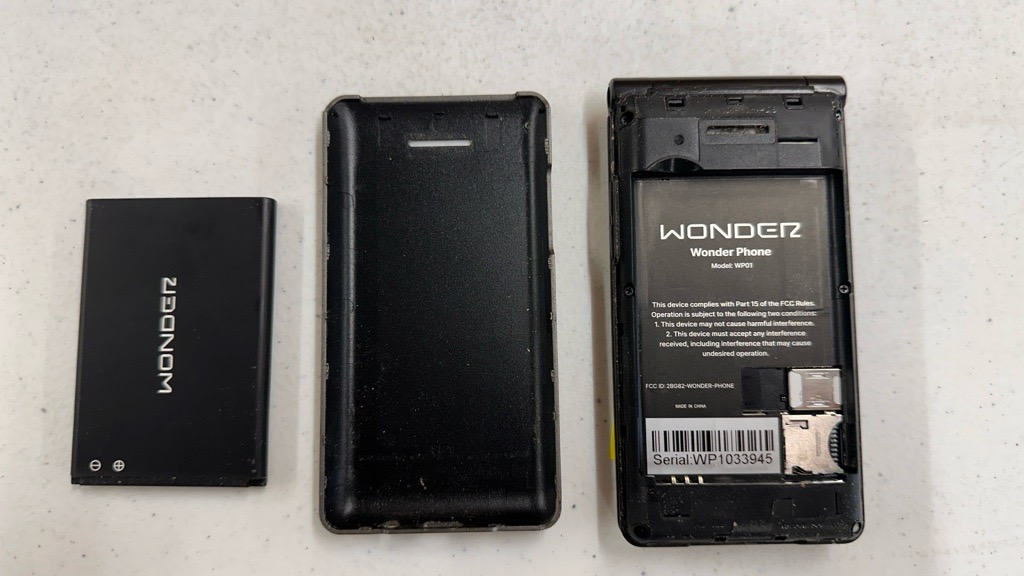
SIM
The SIM is located underneath the battery
Warranty
One year, backed by the manufacturer. Wonder Phone will deal directly with the customer, or with us if preferred. Process is similar to Sunbeam — collect information, then contact the manufacturer. Options:
- Customer calls Wonder directly (least work for us).
- We collect the information and email Pinchas; his team contacts the customer and arranges replacement or repair. (Repair is available if the customer prefers to keep the same device and can be without it for about a week.)
- They provide us with parts for in-house repair. Most parts are about a 5-minute fix for an experienced tech. Since most customers mail in devices rather than visiting the store, this option is generally not recommended — but available for TN location if interested.
Updates
Settings > system update >download >install > done
They have to download the latest update, but then have to contact wonder to actually get it in enabled... Just downloading the update won't enable it, they would have to contact wonder to get that done